

Sell Prescription Eyeglasses Online with WooCommerce
The plugin is released and live on WordPress.org. Install Optogrid Eyeglasses for WooCommerce, or search for “Optogrid Eyeglasses” under Plugins > Add New in your WordPress admin.
Eyeglasses by Optogrid adds a complete lens customization experience to your WooCommerce product pages. Your customers choose frames, configure lenses, enter their prescription, and measure their PD, all without leaving your store.
Why Optical Retailers Struggle to Sell Rx Eyewear Online
Most WooCommerce stores are built for simple products. Prescription eyeglasses are not simple. Each order requires a valid prescription, accurate pupillary distance, and a lens configuration that matches the customer’s needs. Without purpose-built tooling, merchants either cobble together generic plugins or give up on online Rx sales entirely.
The result: lost revenue from customers who want to buy online but can’t complete the process. Prescription fields are missing, PD measurement is unavailable, and lens pricing requires manual quotes that kill conversion rates.
How Merchants Sell Rx Eyewear Online: A Comparison
| Approach | Rx validation | PD capture | Dynamic pricing | Engineering cost |
|---|---|---|---|---|
| Eyeglasses by Optogrid | Built-in field validation (SPH, CYL, Axis, ADD, PD) | Photo-based, integrated at checkout | Real-time, per-option pricing rules | None (visual builder, no code) |
| Generic WooCommerce + custom fields | Manual, error-prone | Not available by default | Requires custom development | Low to medium |
| Headless custom build | Fully custom | Fully custom | Fully custom | High |
Six Features That Turn a WooCommerce Store Into an Rx Eyewear Retailer
Visual Lens Builder
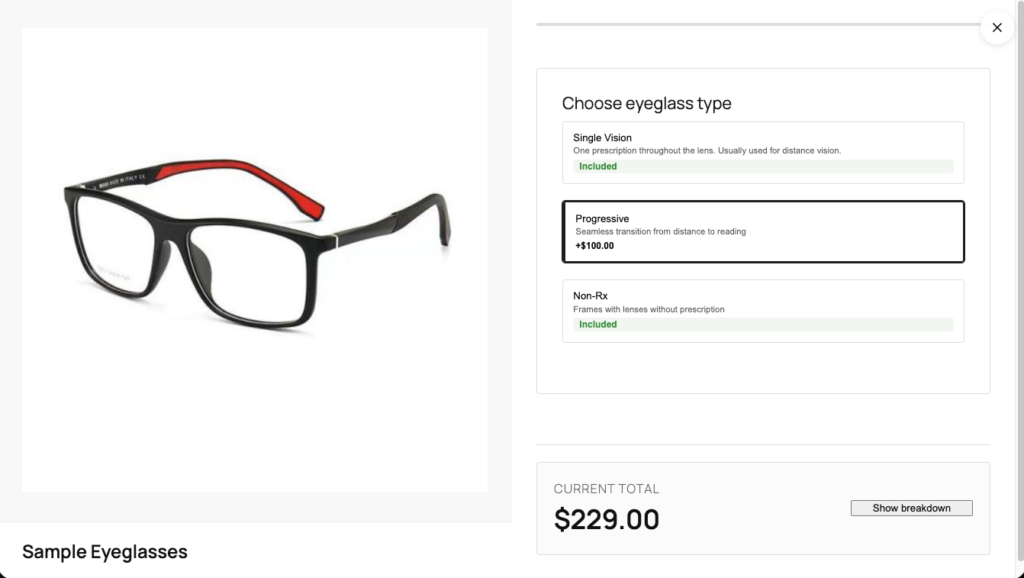
A step-by-step configurator embedded on each product page. Customers select lens type, coatings, tints, and add-ons through a guided flow that keeps them moving toward checkout.
Prescription (Rx) Input
Built-in prescription form with field validation for SPH, CYL, Axis, ADD, and PD. Customers enter their Rx directly on the product page. Invalid values are flagged before checkout.
Digital PD Measurement
Integrated with Optogrid’s measurement technology so customers can measure their pupillary distance from home using a photo. This removes the single biggest barrier to buying prescription glasses online. Manual PD entry needs no account; photo measurement and Rx document upload require a connected Optogrid account.
Dynamic Pricing
Prices update in real time as customers select lens options. Merchants set pricing deltas per option. No manual quotes, no surprises at checkout.
Merchant Flow Builder
A visual admin tool for configuring the entire lens journey: steps, options, conditional logic, pricing rules, and branding. No coding required.
Setup Wizard
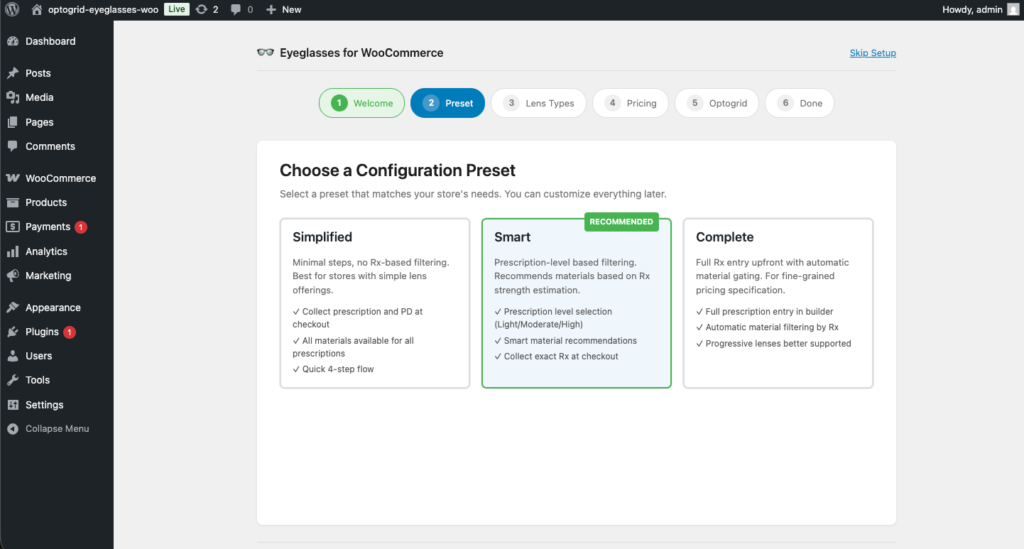
Guided onboarding walks merchants through initial configuration. Define your lens options, set pricing, and start selling within a single session.
From Install to First Sale in Four Steps
For Merchants
- Install the plugin on your WordPress + WooCommerce store.
- Configure your lens flow using the visual flow builder. Add lens types, coatings, tints, and pricing rules.
- Assign the builder to products you want to sell as prescription eyewear.
- Go live. Customers see the lens builder on those product pages immediately.
For Customers
- Choose a frame from your store.
- Customize lenses through the guided builder (type, coatings, tints).
- Enter their prescription using the validated Rx form.
- Measure PD from home with Optogrid’s digital measurement tool, then check out.
WordPress, WooCommerce, and Elementor Compatibility Details
- Full WooCommerce integration. Lens configurations persist through cart, checkout, and order metadata. Your fulfillment team sees every detail. The plugin declares compatibility with High-Performance Order Storage (HPOS) and with block-based cart and checkout.
- Editor compatibility. Works with the Classic Editor, the Block Editor, and Elementor Pro. Divi, Bricks, and WPBakery are not officially supported yet.
- Optogrid API. Connects to Optogrid’s measurement platform for photo-based PD measurement and prescription document upload. Values typed into the Rx form stay on your own store as WooCommerce order metadata.
- Requirements. WordPress 6.5 or later, WooCommerce 8.0 or later, and PHP 8.0 or later. Installs from the WordPress.org directory like any other plugin.
Frequently Asked Questions
What WooCommerce and WordPress versions are supported?
The plugin requires WordPress 6.5 or later, WooCommerce 8.0 or later, and PHP 8.0 or later. The WordPress.org listing shows the current version and the WordPress release it was tested against.
Does the plugin work with Elementor and the Block Editor?
Yes. The lens builder is compatible with the Classic Editor, the Block Editor (Gutenberg), and Elementor, including a dedicated integration for the Elementor Pro Single Product “Add to Cart” widget. Divi, Bricks, and WPBakery are not officially supported yet: on those builders the plugin falls back to a JavaScript injection that may not place the “Select Lens” button reliably, so test on a staging site first.
How is prescription data stored and secured?
Prescriptions and PD values typed into the form stay on your own store, saved as WooCommerce order metadata and included in the admin order-confirmation email. Files are handled differently: prescription document uploads and PD photos are stored on Optogrid’s servers, where the photo-based measurement runs. Deleting the plugin removes its settings and connection credentials but preserves order data, so past orders can still be fulfilled.
How accurate is photo-based PD measurement compared to an in-store ruler?
Optogrid’s photo-based measurement uses computer vision to capture interpupillary distance from a standard selfie. The technology is designed to meet the accuracy requirements for ophthalmic lens dispensing. For patients with complex prescriptions or unusually narrow fitting requirements, in-store verification remains the gold standard.
Which lens types are supported?
The flow builder supports single-vision, progressive, and occupational lenses. Merchants configure which lens types, coatings, tints, and add-ons appear in the builder, so the available options match exactly what your lab can fulfill.
Is the plugin free, and what requires a paid Optogrid account?
The plugin is free from the WordPress.org directory. The lens builder, dynamic pricing, manual Rx capture, and manual PD entry work without an Optogrid account. A connected account is required only for the file-based features: prescription document upload, PD photo capture, and operator-verified measurement results.
How do orders flow from checkout to the optical lab?
Each completed order stores the full lens configuration (lens type, coatings, Rx values, PD) as WooCommerce order metadata. Your fulfillment team can view all details directly in the WooCommerce order admin, and the data can be exported or integrated with your lab’s ordering system.
Related Reading
- Launching your optical ecommerce store — a full comparison of ecommerce options for optical retailers
- Remote eyewear fitting playbook — the complete patient workflow for online prescription sales
- AI in optical practices — how automation is reshaping the dispensing process
- Why customers leave optical shops — measurement errors and online conversion as a retention factor
Start Selling Prescription Eyewear on Your WooCommerce Store
Eyeglasses by Optogrid gives optical retailers the tools to sell Rx eyewear online without building custom software. Read how we built the plugin for the technical background, or install it from WordPress.org and configure your first lens flow.