
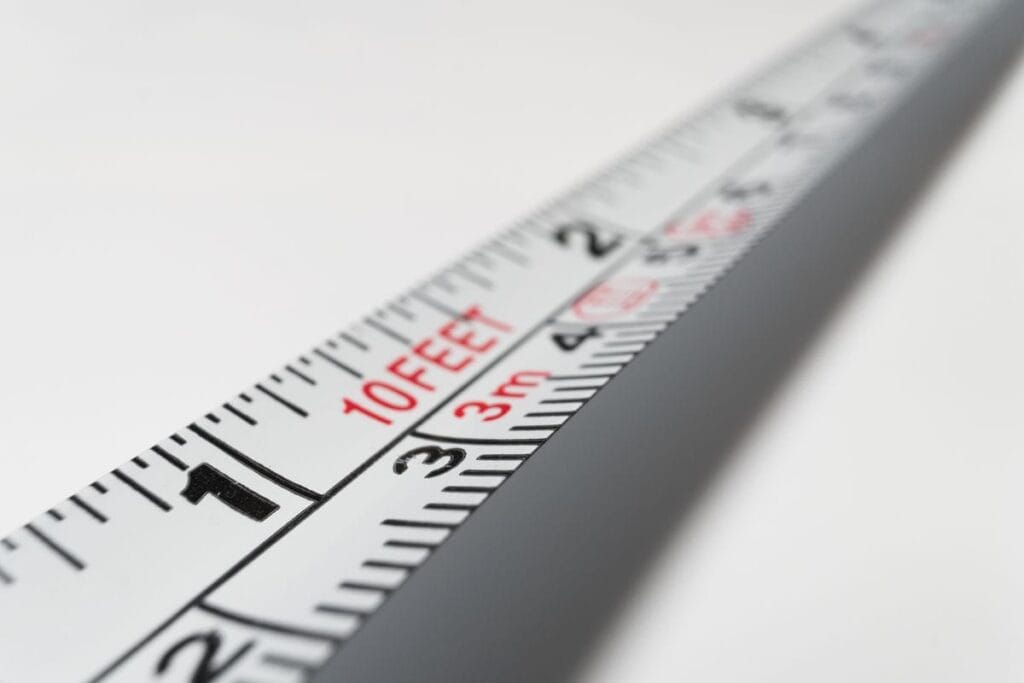
Short Answer: Custom Reference Registers let you save frequently-used measurement references (like frame widths, ruler lengths, or calibration objects) in Optogrid settings. Once saved, you can instantly apply them to future PD measurements without re-entering dimensions each time—saving time and ensuring consistency across measurements.
For optical professionals handling high volumes of measurements or working with specific frame brands repeatedly, Custom References eliminate repetitive data entry and reduce the chance of calibration errors.
What Are Custom References and How Do They Work?
In digital PD measurement, a reference object provides the scale calibration that allows Optogrid to convert pixels to real-world millimeter measurements. Common reference objects include rulers, credit cards, or the known width of eyeglass frames.
The challenge: Entering reference dimensions manually for every single measurement becomes tedious, especially when you’re:
- Using the same calibration ruler repeatedly (e.g., a 40cm ruler)
- Measuring for a specific frame brand with known dimensions (e.g., Ray-Ban Wayfarer 140mm width)
- Working in a high-volume optical shop with standardized processes
The solution: Custom References let you save these measurements once and reuse them instantly. Think of it as creating a library of your most-used calibration objects.
According to measurement standards from the American Optometric Association, consistent calibration is essential for maintaining measurement accuracy over time. Custom References ensure you’re using the exact same calibration data every time, eliminating transcription errors.
Types of Custom References You Can Create
1. Frame Width References
Save the exact width (temple-to-temple measurement) of specific frames you work with frequently.
Common use cases:
- Popular frame models you sell often (e.g., “Ray-Ban Wayfarer 52mm – 140mm width”)
- House brand frames with consistent dimensions
- Frame manufacturer standard sizes
Why it matters: Using frame width as a reference is highly accurate because the frame is in the same plane as the patient’s face, reducing parallax errors.
2. Calibration Ruler References
Save standard ruler lengths you use for measurements.
Common examples:
- “15cm Ruler” (150mm)
- “6 Inch Ruler” (152.4mm)
- “40cm Calibration Bar” (400mm)
Best practice: Measure your actual ruler with calipers to account for printing variations. A “6 inch ruler” might actually be 152mm instead of the theoretical 152.4mm.
3. Credit Card References
Standard credit card dimensions are consistent worldwide and make convenient reference objects.
Standard dimensions:
- Width: 85.6mm (ISO/IEC 7810 standard)
- Height: 53.98mm
Advantage: Patients always have a credit card available, making remote measurements easier.
4. Custom Calibration Objects
Save dimensions for any object you use regularly as a reference.
Examples:
- Optometry trial frame widths
- Specific PD measurement tools
- Custom-printed calibration cards
When to Use Custom References vs Manual Entry
| Situation | Recommendation | Why |
|---|---|---|
| Repeat frame brand measurements | Custom Reference | Save the frame width once, reuse for all measurements of that model |
| High-volume optical shop | Custom Reference | Standardize calibration across all staff members |
| One-time unusual reference | Manual Entry | Not worth saving if you’ll never use it again |
| Quality control verification | Custom Reference | Ensure consistent calibration for accuracy audits |
| New frame model each time | Manual Entry | Different dimensions every time means no reuse benefit |
| Remote measurements | Custom Reference | Save “Credit Card – 85.6mm” for consistent patient instructions |
How to Create and Save a Custom Reference (Step-by-Step)
Step 1: Access Reference Settings
Log into your Optogrid account and navigate to the Settings page:
- Look for the Settings icon (gear symbol) in the top-right corner of your dashboard
- Click on Settings to open the settings menu
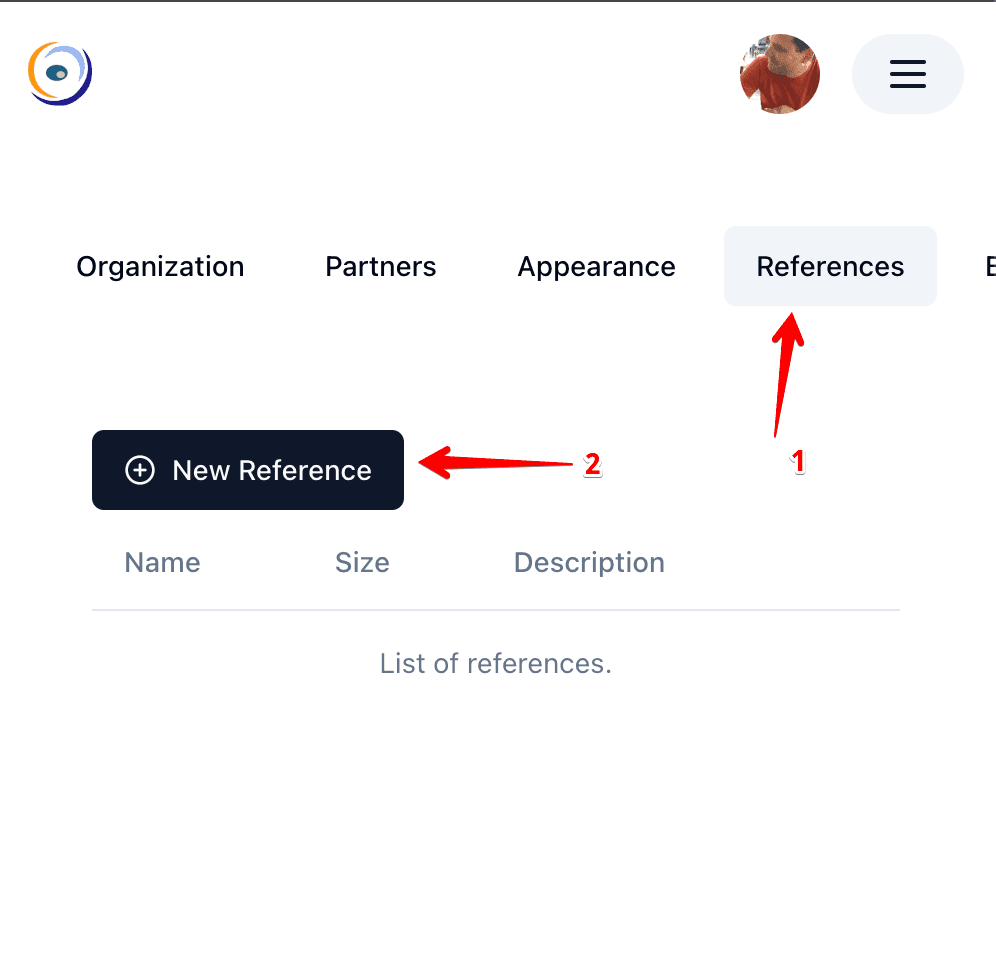
Step 2: Open References Section
Once in settings:
- Select the References option from the left sidebar menu
- You’ll see a list of any existing custom references (if you’ve created them before)
- Click on the Create a New Reference button
Step 3: Enter Reference Details
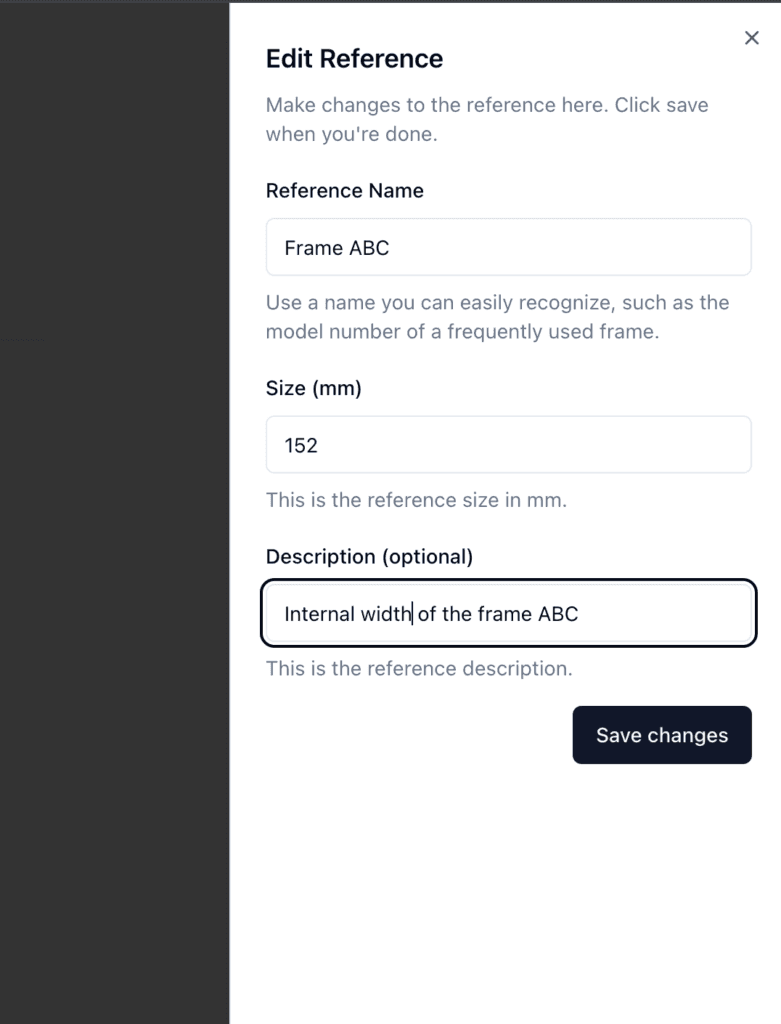
In the Create Reference dialog:
- Name your reference — Use a descriptive name you’ll recognize later
- Good: “Ray-Ban Wayfarer 52mm – 140mm Frame Width”
- Good: “15cm Ruler – Actual 149mm”
- Bad: “Frame 1” (too generic)
- Bad: “Ref” (not descriptive)
- Enter the precise measurement in millimeters
- Measure your reference object with calipers for maximum accuracy
- Enter the measurement value (e.g., 140 for a 140mm frame width)
- Double-check for decimal errors (140mm not 14.0mm or 1400mm)
- Select measurement type (if applicable in your Optogrid version)
- Frame width
- Ruler length
- Custom object
- Click Save to add the reference to your library
Pro tip: Create references in batches for all your common frames or rulers at once, rather than adding them one at a time as needed.
Step 4: Verify Your Reference
After saving, verify the reference appears in your list:
- Check that the name displays correctly
- Verify the measurement value is accurate
- Edit if any errors are found
How to Use Custom References During PD Measurement
Once your references are saved, using them during measurement is quick:
Step 1: Start a New Measurement
Navigate to the Measurement screen when working on a patient photo (whether uploaded via Patient Links or captured directly). If the source image is rotated or tilted, use the image rotation tool to straighten it before placing reference markers, since a crooked image will distort scale calibration.
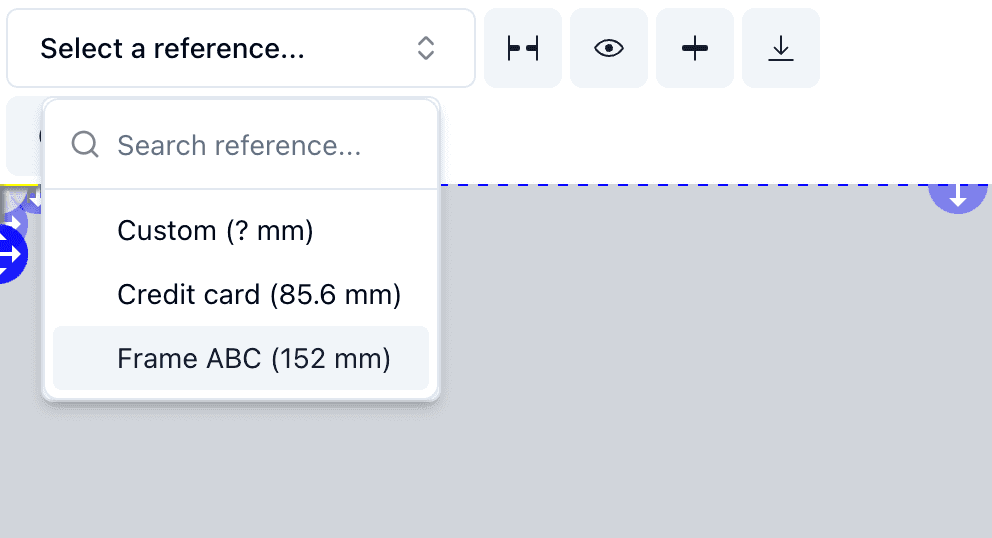
Step 2: Select Your Custom Reference
On the measurement interface:
- Look for the Reference dropdown menu
- Click to open the list of available references
- You’ll see both standard references and your custom references
- Select the appropriate custom reference from your library
Step 3: Apply and Measure
Once selected:
- The reference dimensions are automatically applied to the measurement
- Place the reference markers on the reference object in the photo (just as you would normally)
- Optogrid will use your saved dimensions for scale calibration
- Proceed with PD measurement as usual
Time saved: Instead of typing “140mm” every time, you select “Ray-Ban Wayfarer 140mm” once—saving 10-15 seconds per measurement. In a high-volume shop (50+ measurements/day), this adds up to 10-15 minutes saved daily.
For complete measurement instructions, see our guide on How to Measure PD with Optogrid.
Best Practices for Naming and Organizing References
Naming Conventions
Use consistent, descriptive names that make sense to your entire team:
Frame references:
- Format:
[Brand] [Model] [Size] - [Width]mm - Example: “Ray-Ban Wayfarer 52mm – 140mm”
- Example: “Oakley Holbrook 55mm – 143mm”
Ruler references:
- Format:
[Length] Ruler - Actual [Measurement]mm - Example: “15cm Ruler – Actual 149mm” (if your ruler is slightly off)
- Example: “6 Inch Ruler – 152.4mm”
Standard object references:
- Format:
[Object Type] - [Measurement]mm - Example: “Credit Card – 85.6mm Width”
- Example: “Business Card – 89mm Width”
Organization Tips
- Group by category — Create naming patterns so similar references sort together alphabetically
- All frames start with brand name
- All rulers start with “Ruler”
- Include measurement in the name — Makes it easy to verify you’re using the right reference
- Update names if dimensions change — If you replace a worn ruler with a new one, update the reference or create a new one
- Delete unused references — Periodically clean out references you no longer use to avoid clutter
- Share with team — Make sure all staff members understand your naming conventions
Common Mistakes When Creating Custom References
Mistake 1: Decimal Point Errors
Wrong: Entering 1400 instead of 140mm (off by factor of 10)
Right: Always enter measurements in millimeters, double-check decimal placement
Mistake 2: Using Theoretical vs Actual Measurements
Wrong: Assuming a “6 inch ruler” is exactly 152.4mm
Right: Measure your actual ruler with calipers—it might be 151mm or 153mm due to printing variations
Mistake 3: Generic Names
Wrong: “Frame 1”, “Ref 2”, “Test”
Right: “Oakley Holbrook 143mm”, “Credit Card 85.6mm”
Mistake 4: Not Verifying After Creation
Problem: Saved a reference but never tested it
Solution: Use the reference on a test measurement immediately after creation to verify accuracy
Mistake 5: Confusing Width and Height
Problem: Saving frame height instead of width, or vice versa
Solution: Always specify “Width” or “Height” in the reference name, and double-check which dimension Optogrid expects
Advanced Use Cases for Custom References
High-Volume Optical Chains
Create a standardized reference library across all locations:
- All stores use the same calibration rulers
- Popular frame models have saved references
- New employees can select from established references instead of manual entry
Benefit: Consistency across locations, easier quality control, faster training
Frame Brand Partnerships
If you’re an authorized dealer for specific brands:
- Save references for the top 10-20 frames you sell
- Speeds up lens replacement orders for those frames
- Ensures accurate measurements for high-value progressive lens orders
Benefit: Faster service for repeat customers, fewer measurement errors
Remote/Telehealth Workflows
Create patient-friendly references for remote measurements:
- “Standard Credit Card – 85.6mm Width” (every patient has one)
- “US Driver’s License – 85.6mm Width” (standardized size)
- “Letter Size Paper – 279mm Height” (for patients at home)
Benefit: Simplifies Patient Link instructions—”Use a credit card as your reference”
Quality Control and Accuracy Audits
Maintain a dedicated calibration reference:
- “QC Standard Ruler – 150.0mm (Verified 2026-02-23)”
- Use this reference monthly to verify measurement consistency
- If measurements drift, you know it’s time to recalibrate or check equipment
Benefit: Maintains measurement accuracy over time, supports quality assurance programs
How to Edit or Delete Custom References
Editing an Existing Reference
If you need to update a reference (e.g., measured the object more precisely):
- Go to Settings → References
- Find the reference in your list
- Click the Edit icon (pencil symbol)
- Update the name or measurement value
- Click Save
When to edit: You’ve measured the reference object more accurately, you want to rename it, or you’re correcting an error
Deleting a Reference
If you no longer use a reference:
- Go to Settings → References
- Find the reference to delete
- Click the Delete icon (trash symbol)
- Confirm deletion
Warning: Deleted references cannot be recovered. If you think you might use it again, consider keeping it instead of deleting.
Frequently Asked Questions About Custom References
How many custom references can I create?
There’s typically no hard limit on the number of custom references you can save. However, for practical organization, most optical shops find 10-30 references covers all their common use cases.
Can I share custom references with my team?
References are typically account-wide, so all team members using the same Optogrid account will have access to the same custom references library. Check your account settings for team collaboration features.
What happens if I make a mistake in the reference measurement?
Edit the reference to correct the measurement. Past measurements using that reference won’t automatically update—you’d need to re-measure those patients if accuracy is critical.
Can I export or backup my custom references?
Check your Optogrid account settings for export options. For critical references, consider keeping a backup spreadsheet with reference names and measurements as a safeguard.
Do custom references work with Bridge Markers feature?
Yes! Custom references work seamlessly with Bridge Markers and other Optogrid measurement features. You can save frame-based references and use them in conjunction with bridge marker measurements.
Should I create separate references for left and right temple widths?
No. Frame width is measured temple-to-temple as a single dimension. For dual PD measurements, use Bridge Markers to establish the center line, not separate references.
How often should I verify my reference measurements?
Best practice: Verify physical reference objects (rulers, calibration cards) quarterly. If you drop or damage a reference object, re-measure it immediately before using it again.
Can I use the same reference for different measurement types?
Yes, if the reference object is appropriate for the measurement. For example, a frame width reference can be used for both single PD and dual PD measurements on patients wearing that frame.
Benefits of Using Custom References
Time Savings
Without Custom References:
- Start measurement
- Type reference dimension manually: “140” + “mm”
- Double-check for typos
- Proceed with measurement
With Custom References:
- Start measurement
- Select “Ray-Ban Wayfarer 140mm” from dropdown
- Proceed with measurement
Time saved per measurement: 10-15 seconds
Daily savings (50 measurements): 8-12 minutes
Annual savings (250 working days): 33-50 hours
Accuracy and Consistency
- Eliminates transcription errors — No more typos (140mm vs 14mm vs 1400mm)
- Standardizes calibration — Everyone on your team uses the exact same reference measurements
- Reduces training time — New employees select from established references instead of learning to measure reference objects
Workflow Efficiency
- Pre-measurement setup — Create references once during quiet periods, use them during busy times
- Quality control — Easier to audit measurements when everyone uses standardized references
- Team collaboration — Shared reference library means consistent practices across all staff
Related Optogrid Features
Custom References work seamlessly with other Optogrid measurement tools:
- How to Measure PD, Dual PD, and SH with Optogrid — Complete measurement workflow using custom references
- Bridge Markers — Use frame width references in combination with bridge markers for maximum accuracy
- Patient Links — Send measurement instructions with standardized references (e.g., “use a credit card”)
- About Optogrid — Learn more about our measurement technology and accuracy standards

I grew up inside an optical shop. My mother likes to tell how, as a kid, I would watch eyeglasses being assembled, play with the tools, and draw on the back of service order slips. The family business taught me early what a precise measurement and work done right are worth.
I went on to spend more than twenty years as a software engineer, always keeping an eye on the optical world. Optogrid was born where the two meet: digital measurement technology (pupillary distance and fitting heights) built by someone who knows the dispensing counter from the inside.